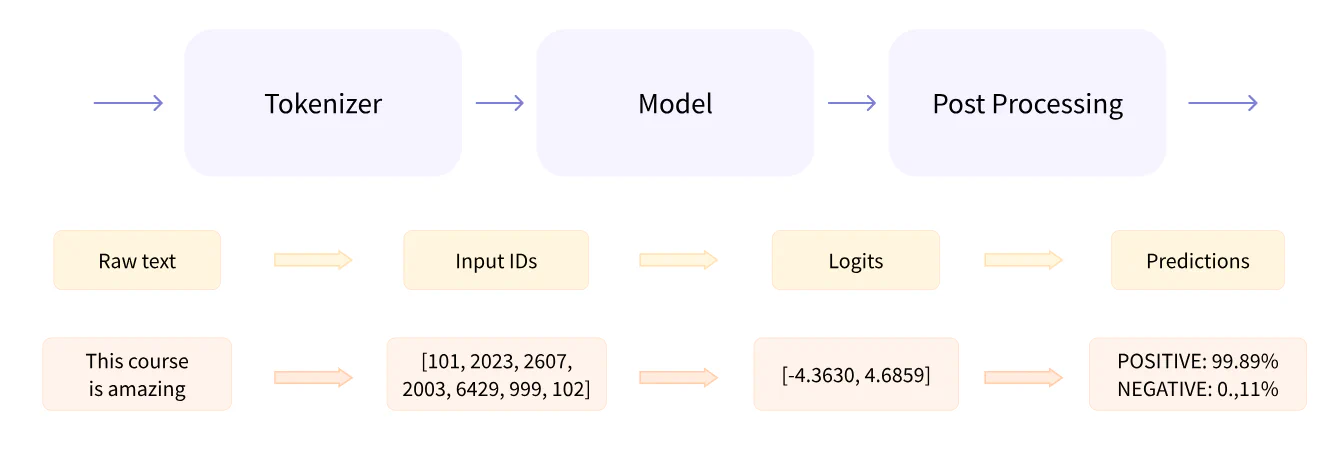
pipeline() groups preprocessing, model inference, and postprocessing together.
Preprocessing with a tokenizer
A tokenizer converts raw text into vectors by:
splitting the input into tokens, such as words, subwords, and punctuation;
mapping each token to an integer;
adding any extra inputs the model needs.
python
 1
 2
 3
 4
 5
 6
 7
 8
 9
10
11
12
13
14
15
fromtransformersimportAutoTokenizercheckpoint="checkoutName"tokenizer=AutoTokenizer.from_pretrained(checkpoint)# all the preprocessing needs to be done exactly the same way as when the model was pretrainedraw_input="context"inputs=tokenizer(raw_inputs,padding=True,truncation=True,return_tensors="pt")# as for the return_tensors, pt: Pytorch, tf: TensorFlow, np: Numpy, jax: JAXprint(inputs)### the results, is a dictionary, which contains two key-value pair{"input_ids":tensor([1,1,1]),# the unique identifiers for each token"attention_mask":tensor([2,2,2])}
Going through the model
The model converts input IDs into logits.
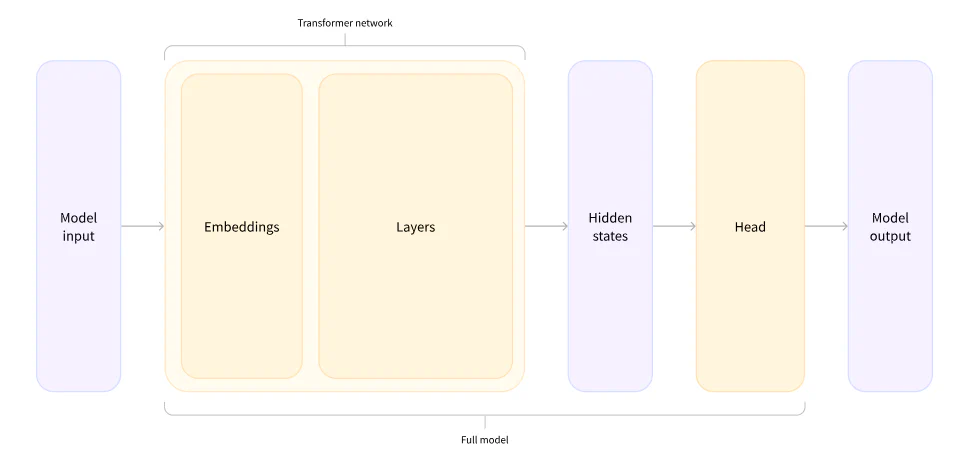
🤗 provides the AutoModel class, which corresponds to the hidden-states step.
python
 1
 2
 3
 4
 5
 6
 7
 8
 9
10
11
12
fromtransformersimportAutoModelcheckout="checkoutname"model=AutoModel.from_pretrained(checkout)outputs=(**inputs)# the Automodel converts the inputs(seen last part) into a three-dimensional vector:"""
1. batch size: the number of sequences processed at a time
2. sequence length
3. Hidden size: usually very large(768, 3072, even more)
"""print(outputs.last_hidden_state.size)# torch.Size([2,16,768])
There are also task-specific architectures. You can understand them as AutoModel followed by a task head:
ForCausalLM
ForMaskedLM
ForMultipleChoice
ForQuestionAnswering
ForSequenceClassification
ForTokenClassification
other 🤗 task heads
python
1
2
3
4
5
fromtransformersimportAutoModelForSequenceClassificationcheckout="checkoutName"model=AutoModelForSequenceClassification.from_pretrained(checkout)outputs=(**inputs)print(outputs.logits.shape)#torch.Size([2,2]), the size is much smaller than the results of AutoModel
Postprocessing the output
Postprocessing converts logits into human-readable predictions, usually by turning raw unnormalized scores into probabilities.
Usually we use a softmax layer for this step.
python
1
2
3
4
5
6
7
8
9
importtorchpredictions=torch.nn.functional.softmax(outputs.logits,dim=-1)print(predictions)'''
tensor([[5.0e-2,9.5e-1],[1.0e-1,9.0-1]],grad_fn=<SoftmaxBackward>)
'''# we can inspect the id2label the following way:model.config.id2label# {0:'NEGATIVE',1:'POSITIVE'}
Models
AutoClass and its relatives are wrappers that can infer the architecture from the checkpoint.
Creating A Transformer
python
1
2
3
4
fromtransformersimportBertConfig,BertModel,config=BertConfig()model=BertModel(config)# in this way, you will get a randomly initialized bert model, which will output gibberishmodel=BertModel.from_pretrained("bert-base-cased")# the model is instantiate with the checkpoint trained by the bert team, which is less time-consuming and more environment-friendly; you can also replace the BertModel with AutoClass. Actually, it is more suggested to use AutoModel rather than a specific model, which will also work even if the architechture is different
Once you use the checkpoint, the weights are downloaded and cached to ~/.cache/huggingface/transformers.
You can use save_pretrained to save the model to disk:
python
1
2
3
4
5
6
7
model.save_pretrained("path/to/directory")!lspath/to/directory"""
config.json pytorch_model.bin
# the two files go hand in hand, the `config.json` contains the attributes necessary to build the architechture, and the `pytorch_model.bin` contains the weights(checkpoints) which are the parameters of your model
"""
Tokenizers
Algorithms for tokenization
Word-Based
Split words according to marks such as spaces and punctuation.
Map each word to an ID. The ID is determined through the vocabulary, which is usually very large. For example, an English vocabulary may be as large as 500,000.
Words outside the vocabulary are often represented by an unknown token such as [UNK] or <unk>. This loses information, so it is sensible to avoid unknown tokens as much as possible.
Character-Based
Split sentences by characters.
This method will definitely reduce the number of unknown tokens. However, it may also make sequences too long and the results less meaningful.
Subword Tokenization
Represent rare words as combinations of frequently used subwords.
This saves vocabulary space while preserving semantic meaning as much as possible, which is especially useful for agglutinative languages such as Turkish.
Examples:
Byte-level BPE: GPT-2
WordPiece: BERT
SentencePiece or Unigram: multilingual models
Loading and Saving
Loading and saving tokenizers is nearly the same as loading and saving models: use from_pretrained and save_pretrained.
Cached algorithms are similar to model architectures.
Cached vocabularies are similar to model weights.
Encoding
There are two steps when encoding text.
Tokenization
python
1
2
3
4
5
6
fromtransformersimportAutoTokenizertokenizer=AutoTokenizer.from_pretrained("modelName")tokens=tokenizer.tokenize("sequence")print(tokens)# print the results of spilting
From tokens to input IDs
Models only accept tensors as inputs, so tokens must be mapped into numbers. The vocabulary is the dictionary that maps tokens to IDs.
Handling Multiple Sequences
Models expect a batch of inputs
python
 1
 2
 3
 4
 5
 6
 7
 8
 9
10
11
12
13
14
15
importtorchfromtransformersimportAutoTokenizer,AutoModelForSequenceClassificationmodel=AutoModelForSequenceClassification.from_pretrained("checkpointName")tokenizer=AutoTokenizer.from_pretrained("checkpointName")tokens=tokenizer.tokenize("raw inputs")token_ids=tokenizer.convert_tokens_to_ids(tokens)input_ids=torch.tensor(token_ids)model(input_ids)"""
IndexError: Dimension out of range (expected to be in range of [-1, 0], but got 1)
"""model([input_ids])# this line will succeed
Padding the inputs
Batches must contain sequences of the same length because tensors are rectangular. This is why we introduce padding_id to pad inputs. You can access it with the tokenizer’s pad_token_id.
Attention masks
One key feature of Transformers is the attention layer that contextualizes each token. As a consequence, padding IDs can also affect the output, which is not expected.
Attention masks solve this. A value of 0 means the corresponding token should be ignored; 1 means it should be used.
All Transformer models have a sequence length limit. If you want to pass a sequence longer than the limit, you should truncate your sequence or switch to a model that allows longer inputs.
Putting it all together
Put the tokenization steps together
As a review, there are three steps we need to tokenize raw inputs:
fromtransformersimportAutoTokenizertokenizer=AutoTokenizer.from_pretrained("checkpointName")# 1sequence="1"input1=tokenizer(sequence)# valid# 2sequences=["1","2"]input2=tokenizer(sequneces)# 3 padinput3=tokenizer(sequences,padding="longest")# pad to the maximum sequece lengthinput4=tokenizer(sequences,padding="max_length")# pad to the model maximum lengthinput5=tokenizer(sequences,padding="max_length",max_length=8)# pad to the specified maximum length# 4 truncateinput6=tokenizer(sequences,truncation=True)# truncate the sequences longer than the model limitinput7=tokenizer(sequences,max_length=8,truncation=True)# truncate the sequences longer than the specified length# 5 switch the type of tensors returnedinput8=tokenizer(sequences,padding=True,return_tensors="pt")# pt stands for the Pytorch, tf for TensorFlow, np for NumPy
Special words
Some models add special tokens such as [CLS] at the beginning; some add [SEP] at the end; some add both; and some add none.
Loading comments…
Comments failed to load. Disqus may be blocked on your network.